TMS Data Modeler and Filter Attributes
Introduction
Starting with v.5.0, TMS Aurelius offers a filtering mechanism based on attributes. This means that instead of altering the criteria before they are passed to the object manager, we can now tag the database entities with attributes and instruct the object manager to update the filter parameters.
TMS Data Modeler (DM) is a tool to help developers design a database and, in the context of this post, it automates and fine-tunes the mapping of Delphi classes to the underlying database entities. Unfortunately, TMS have not updated DM to include the filter attributes, which means the user may need to do a lot of manual editing of the final Delphi code.
In this post, we look at how we can write a script in DM to add filter attributes to the final mapped Delphi classes.
Filter Attributes
Implementing filter attributes is a three step process:
- We define the filter using the
FilterDefattribute - We define any filter parameters using the
FilterDefParamattribute - We decorate the entity classes with the
Filterattribute to indicate which filter applies to what entity
Then, we instruct the object manager to use the filter every time there is a need using EnableFilter.
⚠️ The current implementation of the filter mechanism does not work with foreign keys but only with independent properties (table columns). This is obviously a limitation and, hopefully, TMS will improve it in future releases.
Customers and Orders
Let’s consider the case of a customer (TCustomer) who orders products or services (TOrders). Each order can, naturally, contain multiple items (TOrderItems). The database tables, in their simplest form, can look like Fig. 1.
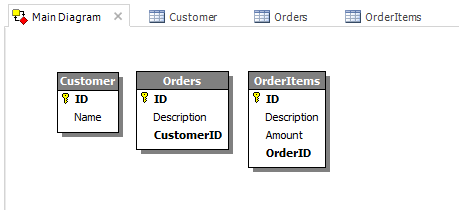
Figure 1: Customers, Orders, Order Items
What we want to achieve is to add the necessary filter attributes to the Delphi classes in the final unit with the entities. The filters should, obviously, filter the orders by customer using CustomerID field in TOrders and filter the individual items in an order using OrderID field in TOrderItems. As noted earlier, filter can work only if we drop the foreign keys.
More specifically, we need to:
- Define a filter for the customers (
customer) that bindsCustomerIDto a value (customer-id) passed to the object manager - Decorate all the classes that have the
CustomerIDproperty with thecustomerfilter - Define a filter for the order(
order) that bindsOrderIDto a value (order-id) passed to the object manager - Decorate all the classes that have the
OrderIDproperty with theorderfilter
Scripts
Launch TMS Data Modeler and create the database tables. Then, select the Tools menu in the ribbon and hit the TMS Aurelius button. This is the wizard to generate the final Delphi unit with the mapped classes. Select the Script tab. This is where we are going to add our code to generate the attributes. The scripting mechanism is implemented by attaching events to the generation process of the final Delphi unit. The unit can be previewed before saved in the Preview tab.
Click on the Declare Events button. From the list of the generated events, we are interested in two of them: OnUnitGenerated and OnClassGenerated. The first one occurs after the code in the unit has been generated and the second one fires after each class (entity) is generated. We are going to use the first event to define the filters and the second one to decide which filter should be attached to what class.
Add the following code to the OnUnitGenerated event:
procedure OnUnitGenerated(Args: TUnitGeneratedArgs);
begin
  Args.CodeUnit.FindType('TCustomer').AddAttribute('FilterDef(''customer'', ''{CustomerID} = :customer-id'')');
  Args.CodeUnit.FindType('TCustomer').AddAttribute('FilterDefParam(''customer'', ''customer-id'', TypeInfo(integer))');

  Args.CodeUnit.FindType('TCustomer').AddAttribute('FilterDef(''order'', ''{OrderID} = :order-id'')');
  Args.CodeUnit.FindType('TCustomer').AddAttribute('FilterDefParam(''order'', ''order-id'', TypeInfo(integer))');
end;
We need to define the two filters by adding the FilterDef and FilterDefParam attributes to the very first class in the unit. I haven’t found a way to iterate through the available classes in a unit. So, I hardcode the name of the first class (TCustomer) and use the FindType and AddAttributes methods to generate the attribute.
💡If you are interested in investigating the available classes, properties and methods in the scripting language you can click on the Debug button and select Library from the View menu in the new window.
In the OnClassGenerated event, we iterate through the members of the class and attach the right filter according to the name of the member.
procedure OnClassGenerated(Args: TClassGeneratedArgs);
var
  num: integer;
  item: TCodeTypeMember;
begin
  for num:=0 to Args.CodeType.Members.Count - 1 do
  begin
    item:=Args.CodeType.Members[num];
    if Copy(item.Name, 0, Length('CustomerID')) = 'CustomerID' then
      Args.CodeType.AddAttribute('Filter(''customer'')');
    if Copy(item.Name, 0, Length('OrderID')) = 'OrderID' then
      Args.CodeType.AddAttribute('Filter(''order'')');
  end;
end;
Source Code
The DM model file with the script can be found in this repository.